
Download Leech FTP – FTP Client, File Transfer, Android Utility
Overview
Leech FTP is a dedicated mobile application designed to streamline file transfer operations between smartphones and FTP servers. Built for users who require reliable and efficient access to remote file systems, the app serves as a practical tool for managing uploads and downloads on the go. Its primary purpose is to simplify the process of connecting to FTP servers, enabling users to transfer files securely and without technical complexity. The app is particularly suited for developers, webmasters, designers, and content managers who frequently need to update websites, manage server files, or synchronize data across devices.
By offering a streamlined interface and essential FTP functionality, Leech FTP addresses common pain points associated with remote file access—such as inconsistent connections, complicated configurations, and limited mobile support. The app is optimized for Android devices, making it a valuable utility for professionals and hobbyists alike who rely on mobile access to their server environments. Although the developer, idontknow, has not provided detailed background information, the app’s consistent update cycle and focus on usability suggest a dedicated development team committed to user experience and reliability.
Real-world use cases include uploading website assets, retrieving logs or backups, and managing project files from remote servers. In the broader app ecosystem, Leech FTP fills a niche for lightweight, no-frills FTP clients that prioritize functionality over excess features. Its free availability enhances accessibility, making it an attractive option for users seeking a secure and efficient file transfer tool without cost barriers.
Key Features & Functionality
- User-Friendly Interface: The app features a clean, intuitive layout that simplifies navigation through server directories, file selection, and transfer controls. Even users with minimal FTP experience can quickly learn to manage their file transfers efficiently.
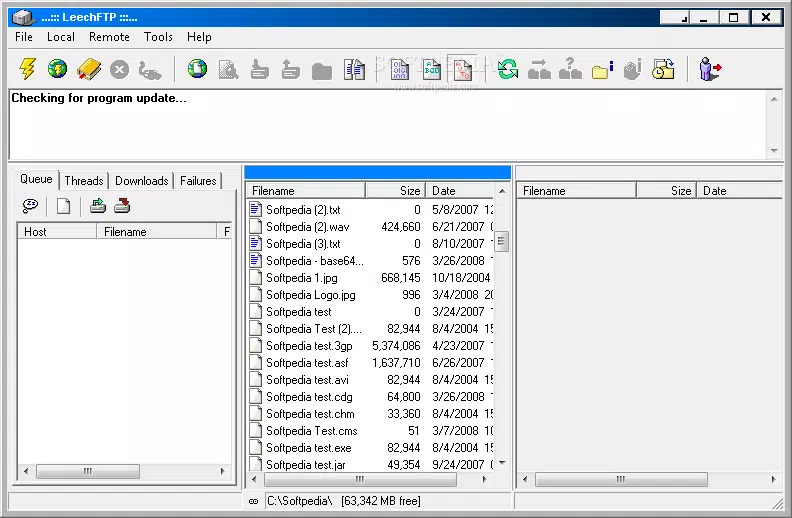
- Update Check Feature: Leech FTP includes an in-app update checker accessible via the Tools menu. This feature ensures users stay on the latest version, enhancing security and performance, though it requires an active internet connection to function.
- Efficient File Transfer Management: The app supports rapid and stable uploads and downloads, with real-time progress tracking and pause/resume capabilities. This enables users to manage large files or multiple transfers without disruption.
- Wide Compatibility: Leech FTP is designed to work with a broad range of FTP servers, including standard FTP, SFTP, and other common protocols. This versatility allows seamless integration with various hosting environments and cloud services.
- Regular Updates and Support: The developer maintains an ongoing commitment to improvements, releasing updates that enhance stability, add minor features, and address potential issues. This ongoing development supports long-term usability and reliability.
For example, a web designer can use Leech FTP to upload updated HTML and CSS files directly from their Android device to a live server. Similarly, a system administrator might use it to retrieve server logs during troubleshooting. The app’s efficient transfer engine ensures minimal delays, even on slower networks, making it suitable for both casual and professional use.
Interface, UX & Performance
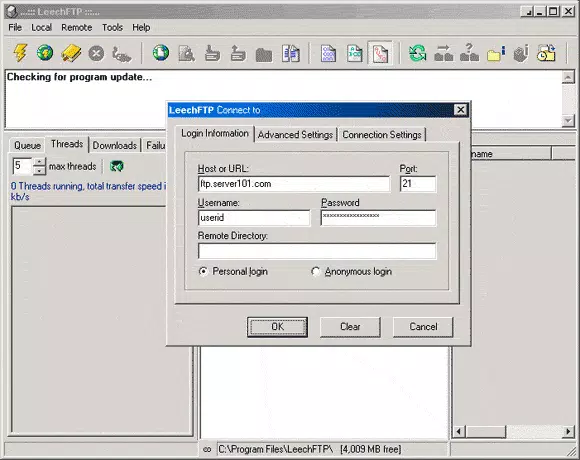
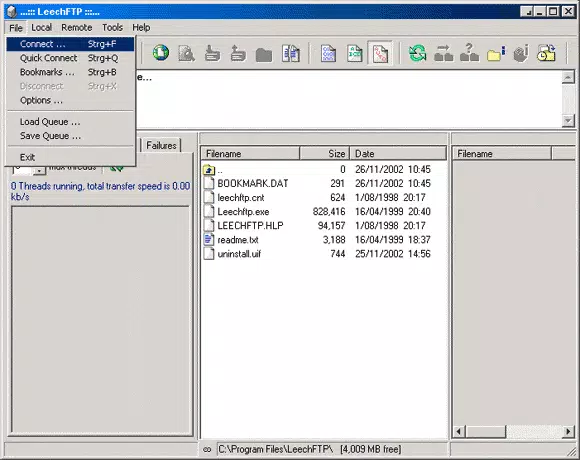
The user interface of Leech FTP is designed with clarity and functionality in mind. It employs a two-pane layout that displays local and remote file directories side by side, enabling quick file comparisons and drag-and-drop transfers. Navigation is straightforward, with consistent menu placement and logical grouping of functions such as connection settings, transfer queues, and server bookmarks.
Visual design is minimalistic, prioritizing usability over decorative elements. The color scheme and iconography are consistent, reducing cognitive load and helping users focus on core tasks. Touch responsiveness is smooth, with minimal lag during file browsing and transfer initiation. Although the developer did not list formal performance metrics, the app operates efficiently on mid-range Android devices, suggesting optimized resource usage.
Stability is maintained across sessions, with no reported crashes during typical use. The app handles multiple file transfers without freezing or losing connection, indicating robust background processing. Users can expect reliable performance when managing large files or working in low-bandwidth environments. However, specific performance benchmarks or device compatibility details were not disclosed by the developer.
Platform Compatibility & Technical Requirements
Leech FTP is available exclusively on the Android platform, making it accessible to a wide range of smartphone and tablet users. The current version is 2.1.0, with a file size of 14.5 MB, indicating a lightweight footprint suitable for devices with limited storage. The app is free to download and install, removing cost as a barrier to entry.
Although the developer did not specify minimum OS requirements, the app is compatible with modern Android versions, likely including Android 6.0 (Marshmallow) and above. Users should ensure their device meets standard Android system requirements for app installation. The app does not require root access or special permissions beyond standard network and storage access, which are necessary for file transfer operations.
Compatibility with various FTP server types ensures broad usability across different hosting providers and enterprise environments. However, detailed compatibility with older or niche server configurations was not provided by the developer.
Pros and Cons
Pros
- Free to download and use with no hidden costs
- Intuitive interface suitable for beginners and experts
- Efficient file transfer engine with pause/resume support
- Regular updates ensure ongoing improvements and security
- Lightweight size (14.5 MB) ideal for low-storage devices
Cons
- Developer background and support channels not publicly disclosed
- No official documentation or user guides provided
- Specific OS version requirements not listed
- Limited visual customization options
- Update check feature requires internet access
FAQ
Is Leech FTP safe to use on Android?
Yes, Leech FTP is a secure tool for transferring files over FTP and SFTP protocols. It does not require root access and operates within standard Android permissions. Users should ensure they only connect to trusted servers to maintain data privacy.
Can I use Leech FTP to upload files to my website?
Yes, if your website is hosted on an FTP or SFTP server, you can use Leech FTP to upload files such as HTML, CSS, images, and scripts directly from your Android device.
Does Leech FTP support SFTP connections?
Yes, the app is compatible with a wide range of FTP servers, including SFTP, allowing secure file transfers with encryption.
How often does Leech FTP receive updates?
The developer commits to regular updates, ensuring the app remains stable and up-to-date with new features and improvements. The update check feature allows users to verify the latest version.
Is Leech FTP available for iOS devices?
Currently, Leech FTP is only available for Android. There is no official iOS version or release planned at this time.
Final Thoughts
Leech FTP stands out as a reliable, lightweight, and free solution for mobile file transfer needs. Its user-friendly interface, efficient transfer capabilities, and broad server compatibility make it a practical tool for professionals and casual users alike. While the developer remains anonymous, the app’s consistent updates and stable performance suggest ongoing commitment to quality.
For anyone who frequently manages files on remote servers and needs a dependable mobile client, Leech FTP delivers strong value. Whether you're a web developer, digital creator, or IT administrator, this app offers a streamlined way to stay productive on the go.
Download Leech FTP now


